> ## Documentation Index
> Fetch the complete documentation index at: https://docs.posy.page/llms.txt
> Use this file to discover all available pages before exploring further.
# Introduction
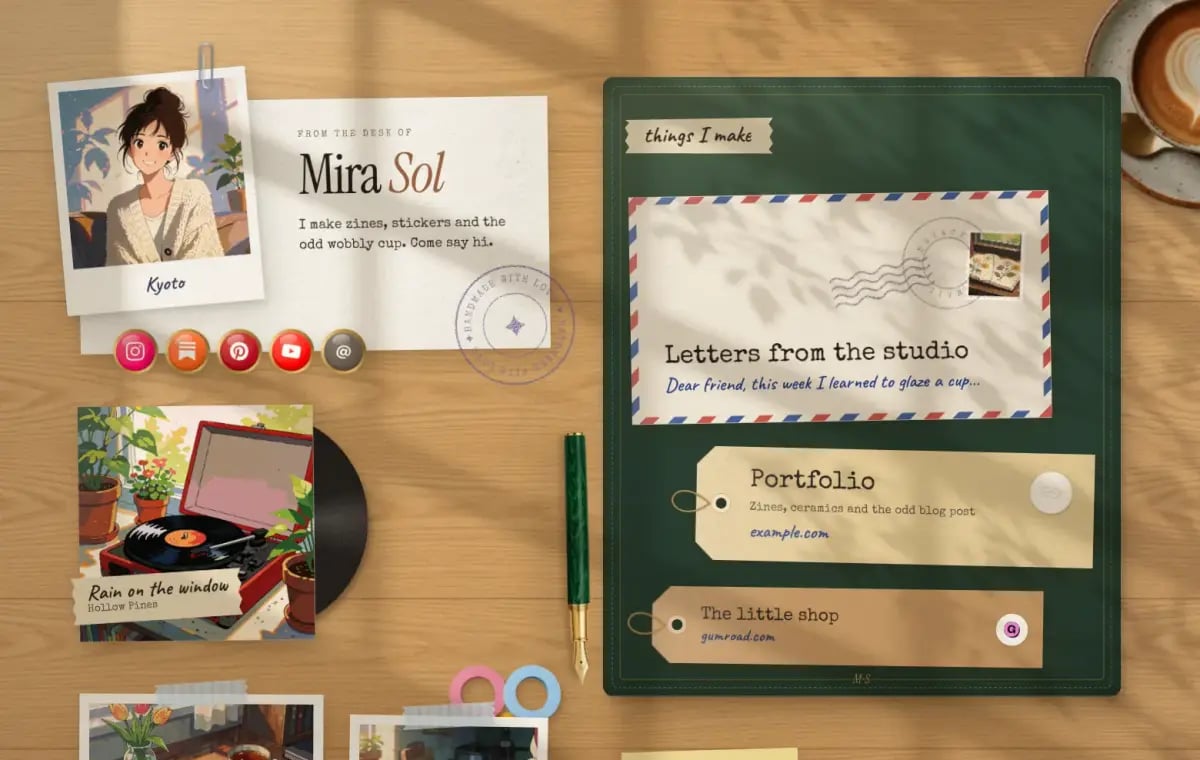
> Posy is a link-in-bio page that looks hand-made. Pick a look, add your links, publish. Edit it yourself or let your AI do it.
Posy is free and open source. Use it at [posy.page](https://posy.page), or run it on your own server. Your whole page is one small JSON file, so the studio, your AI and your scripts all edit the same thing.
 ## Start here
Make a page on posy.page in about two minutes.
Add links, photos and notes, then publish.
Claude, ChatGPT, Cursor, VS Code, Claude Code and Codex.
Docker, Compose, Vercel with Turso, or any Node host.
## How it fits together
* **The studio** at posy.page is the editor. Paste a link and Posy picks the right tile for it.
* **Looks** decide how the page is drawn: Desk, Washi, Lofi, Painted, Cobalt and Night. See the [looks gallery](/looks).
* **The page file** is the JSON behind every page. Any chat app can write one, and you can open it at [posy.page/new](https://posy.page/new). See [the page file](/agents/format).
* **The MCP server** at `https://posy.page/api/mcp` lets AI apps edit and publish your page. See [MCP tools](/agents/tools).
* **The REST API** does the same over HTTP with an API key. See the [API reference](/api-reference/introduction).
For AI assistants, the whole documentation is in one file at [posy.page/llms-full.txt](https://posy.page/llms-full.txt).
This documentation is built and hosted on [Mintlify](https://mintlify.com), a developer documentation platform.
## Start here
Make a page on posy.page in about two minutes.
Add links, photos and notes, then publish.
Claude, ChatGPT, Cursor, VS Code, Claude Code and Codex.
Docker, Compose, Vercel with Turso, or any Node host.
## How it fits together
* **The studio** at posy.page is the editor. Paste a link and Posy picks the right tile for it.
* **Looks** decide how the page is drawn: Desk, Washi, Lofi, Painted, Cobalt and Night. See the [looks gallery](/looks).
* **The page file** is the JSON behind every page. Any chat app can write one, and you can open it at [posy.page/new](https://posy.page/new). See [the page file](/agents/format).
* **The MCP server** at `https://posy.page/api/mcp` lets AI apps edit and publish your page. See [MCP tools](/agents/tools).
* **The REST API** does the same over HTTP with an API key. See the [API reference](/api-reference/introduction).
For AI assistants, the whole documentation is in one file at [posy.page/llms-full.txt](https://posy.page/llms-full.txt).
This documentation is built and hosted on [Mintlify](https://mintlify.com), a developer documentation platform.